{"section":"tutorials","requestedLocale":"en","requestedSlug":"renewing-api-tokens","locale":"en","slug":"renewing-api-tokens","path":"docs/en/tutorials/account-management/api-keys/renewing-api-tokens.md","branch":"main","content":"The older the token, the greater the risk of exposure and potential damage to the operation. The token renewal procedure guarantees the continuity of your store security and minimizes potential vulnerabilities. \n\nRenew your API token regularly, ideally before the renewal alert, to keep your store safe.\n\nFollow the steps below to renew the token of an API key:\n\n1. In the top bar of the VTEX Admin, click your **profile avatar** — indicated by the first letter of your email — and then click *Account Settings > API Keys*. \n2. Make sure you are in the **Generated** tab. \n3. In the row of the desired API key, click the kebab menu (⋮) and then `Renew Token`.\n\n You can view the new token from a single-access link, which is valid for 24 hours unless it is accessed.\n\n4. Click `Copy` to copy the single-access link to the new token to the clipboard. This link will only be displayed once.\n5. In the section **Delete the old token**, check one of the following options:\n\n * **Later:** You must [manually delete](#deleting-old-tokens) the old token once the new token is used in the integrations. Both tokens will be valid and functional until the old one is deleted. In the list on the **Generated** tab, in the **Token Duration** column, the duration of both tokens will be displayed, until the old one is deleted. \n * **Now:** The old token will be deleted from the system at the end of the renewal process and only the new token will be valid.\n\n > ℹ️ If the page is closed before selecting a deletion method in this step, the **Later** option will be applied, meaning that you must manually delete the old token.\n\n6. Click `Complete`.\n7. Access the copied link or share it with the person that will use the new token. The link can only be accessed once and is valid for 24 hours if not accessed.\n8. Click `Copy` to copy the API token to the clipboard. This secret will only be displayed once. Save it in a safe place.\n\n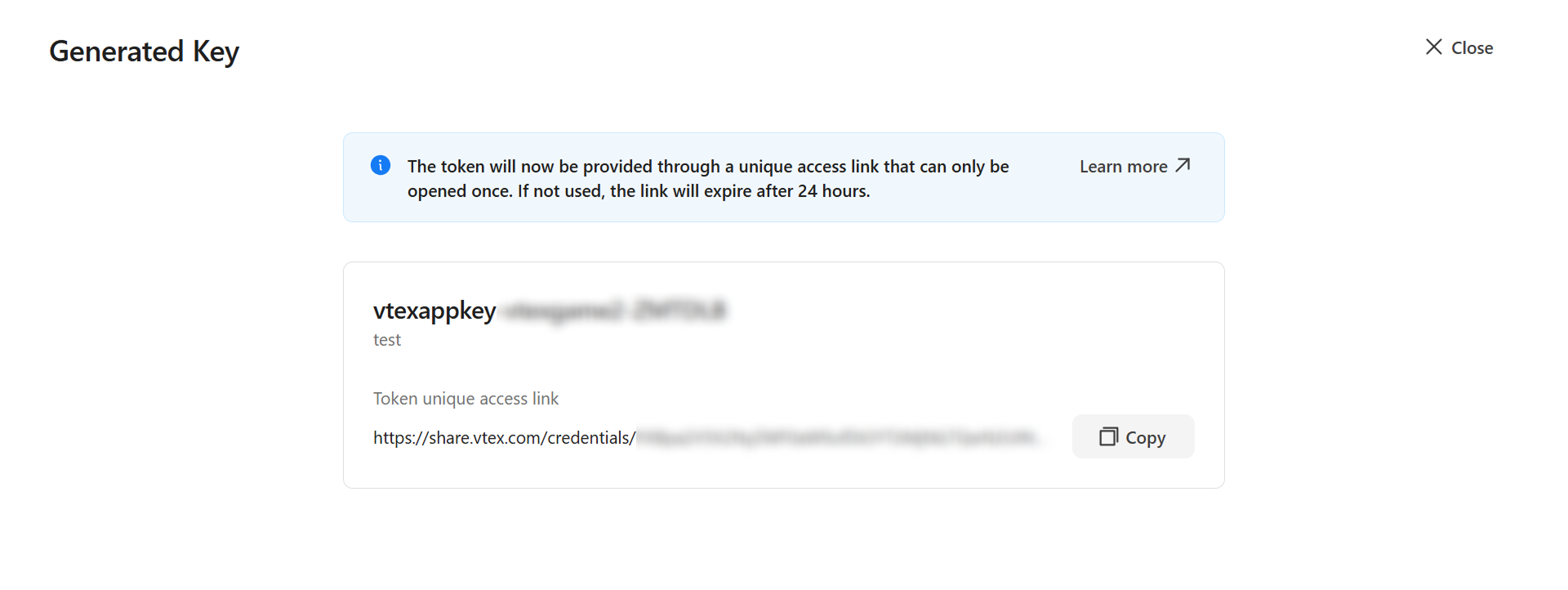\n\nOnce the renewal is completed, you can't renew the token again until the single-access link is accessed or expires within 24 hours. If necessary, you can [undo the token renewal](#undoing-token-renewal) while the link is still valid. \n\nIf the single-access link expires before it is used, repeat the steps to renew the token and generate a new link.\n\n> ⚠️ The official URL for accessing the token always follows the format `share.vtex.com/credentials/{token}`. The `{token}` is a random identifier generated when the key is created or renewed. Check the link format before accessing it to avoid phishing attempts or malicious pages.\n\n## Deleting old tokens\n\n> ⚠️ Ensure the API key is no longer in use by any integration before deleting it. This action cannot be undone.\n\nFollow the instructions below to manually delete an old token after renewal. This procedure is only possible when the **Later** option for deletion was selected during the token renewal process. \n\n1. In the top bar of the VTEX Admin, click your **profile avatar** — indicated by the first letter of your email — and then click *Account Settings > API Keys*. \n2. Make sure you are in the **Generated** tab. \n3. In an API key row with the *Pending deletion - Old token* alert, click the vertical ellipsis menu (⋮), then click `Delete old token`.\n\n \n\n4. Click `Delete` to confirm. \n\n## Undoing token renewal\n\n> ⚠️ This procedure is only possible if the old token has not been [deleted](#deleting-old-tokens). If the old token has been deleted, you will need to renew the token again or [delete the API key](/en/docs/tutorials/generated-keys#delete-key).\n\nIf you renewed your token by mistake or forgot to copy the newly generated token, follow the steps below to undo the renewal. \n\n1.\tIn the top bar of the VTEX Admin, click your **profile avatar** — indicated by the first letter of your email — and then click *Account Settings > API Keys*. \n2.\tMake sure you are in the **Generated** tab. \n3.\tIn the row of the desired API key, click the kebab menu (⋮) and then `Undo Renewal`. \n4.\tClick `Undo` to confirm.\n\n## Learn more\n\n* [API Keys](/en/docs/tutorials/api-keys)\n* [Configuring API token renewal alert](/en/docs/tutorials/configuring-alerts-to-renew-api-tokens)\n* [Generated keys](/en/docs/tutorials/generated-keys)"}