{"section":"tutorials","requestedLocale":"en","requestedSlug":"planner-releases-page-beta","locale":"en","slug":"planner-releases-page-beta","path":"docs/en/tutorials/beta/releases-beta/planner-releases-page-beta.md","branch":"main","content":"> ℹ️ The **Releases** is in beta version, which means we are working to improve it. This feature is only available for stores using [FastStore](https://www.faststore.dev/).\n\nThe **Releases** module allows you to [manage your releases](/en/docs/tutorials/planner-release-concept-beta) so that you can coordinate the creation, schedule and publication of the changes in your store.\n\nIn the navigation menu of the **Releases** in the VTEX Admin, you'll find the **Releases** and [Calendar](/en/docs/tutorials/planner-calendar-page-beta) pages. You can create a new release and perform other [actions](/en/docs/tutorials/planner-actions-on-releases-beta) under **Releases**.\n\nOn the **Releases** page, you'll see all existing releases listed by the `Not scheduled` [status](/en/docs/tutorials/planner-release-concept-beta#status-of-releases) releases first, followed by those already scheduled. \n\nThe order of the scheduled releases is based on the publication date: The further into the future a release is, the sooner it'll appear on the list. However, the older the release is, the latest it'll appear.\n\n> ⚠️ In the beta version, releases must be [CMS](/en/docs/tracks/cms-vtex-io)-related, because other VTEX platform modules are not yet included. To use the **Releases**, you must configure the CMS as described in [Installing Releases on VTEX Headless CMS (Legacy)](https://www.faststore.dev/how-to-guides/cms/vtex-headless-cms/Installing%20Releases%20on%20VTEX%20Headless%20CMS).\n\n## List view\n\nGo to the **Releases** navigation menu to access the **Releases** page in the VTEX Admin. In the following image, you'll see the interface and what you can do in it:\n\n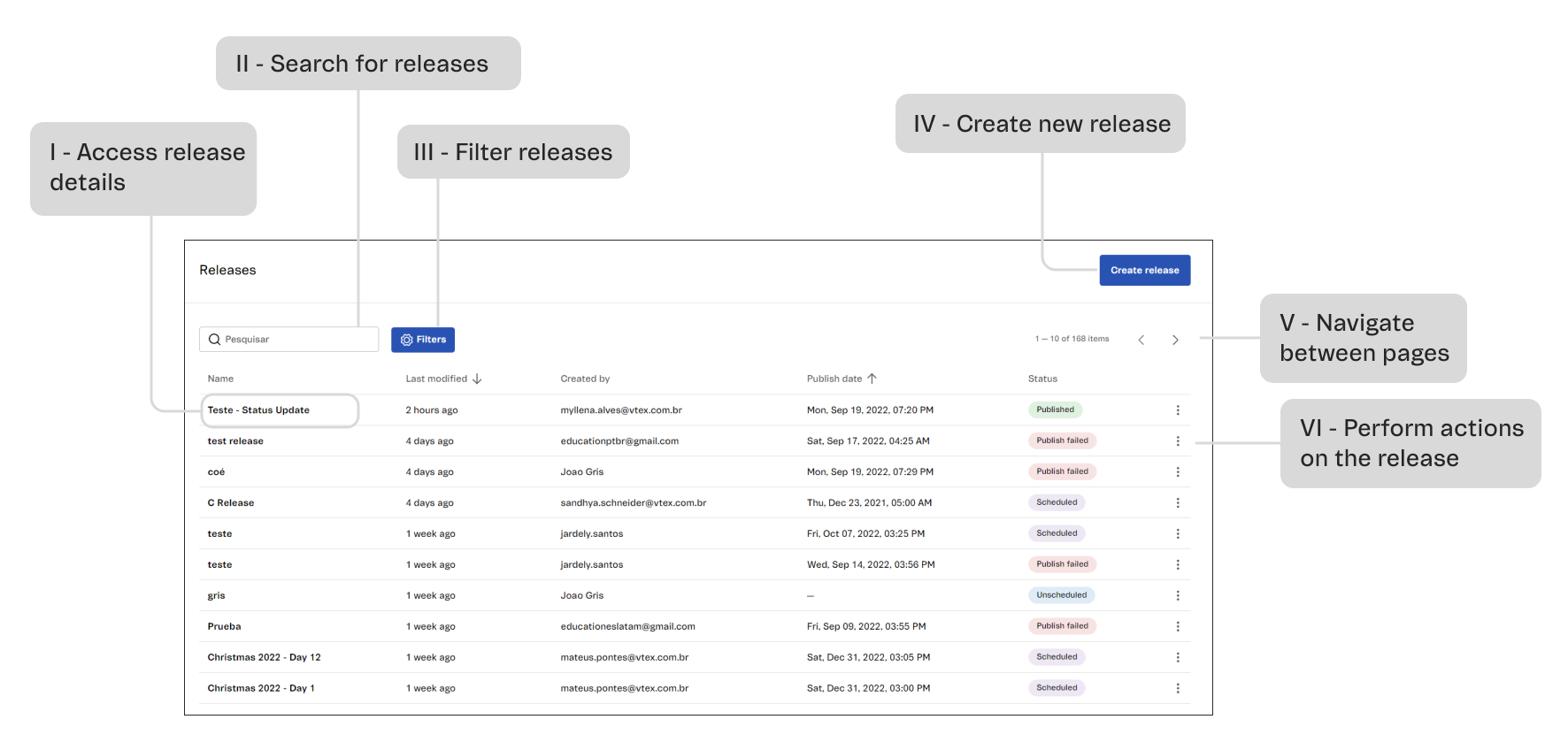\n\n| Field | Description |\n|---|---|\n| **Name** | Name that identifies the release, defined during the creation. It can be edited at any time, as long as the release is not published. |\n| **Last Modified** | Time elapsed since the last modification to the release. |\n| **Created by** | ID of the last user who modified the content of the release. |\n| **Publish Date** | Date and time or scheduled date and time of the publication of the release. In case the release does not have a defined date, this field will appear as `Not scheduled`. |\n| **Status** | Indication of the [release status](/en/docs/tutorials/planner-release-concept-beta#status-of-releases). |\n\nIn the **Releases** page, you can:\n\n**I - Access release details:** Click on a release and you'll be redirected to the page with the details of the release.\n\n**II - Search for releases:** Enter the name of the release you want to find in the search bar. The search takes into consideration all existing releases.\n\n**III - Filter releases:** To filter by [release status](/en/docs/tutorials/planner-release-concept-beta#status-of-releases), use the `Status` button and choose the desired option. To filter by scheduled date or publication date, click on `Date` and choose the desired date.\n\n**IV - Create new release:** To create a new release, click on the `Create Release` button and follow the step-by-step instructions in [Releases: Actions on releases](/en/docs/tutorials/planner-actions-on-releases-beta).\n\n**VI - Navigate between pages:** To see more release results, navigate the result pages using the arrows .\n\n**VII - Perform actions on the release:** Depending on the [release status](/en/docs/tutorials/planner-release-concept-beta#status-of-releases), the three-dots menu will show different action options. To check out the possible actions, read [Releases: Actions on releases](/en/docs/tutorials/planner-actions-on-releases-beta).\n\n## Learn more\n\n* [Releases: Release concept](/en/docs/tutorials/planner-release-concept-beta)\n* [Releases: Actions on releases](/en/docs/tutorials/planner-actions-on-releases-beta)\n* [Releases: Calendar page](/en/docs/tutorials/planner-calendar-page-beta)"}