{"section":"tutorials","requestedLocale":"en","requestedSlug":"external-keys","locale":"en","slug":"external-keys","path":"docs/en/tutorials/account-management/api-keys/external-keys.md","branch":"main","content":"External API keys are credentials generated in and managed by other VTEX accounts. By adding [roles](/en/docs/tutorials/roles) to API keys — which are equivalent to usernames — provided by third parties, you can allow them to access specific resources in your account. \n\nThe **External** tab lists the API keys created by your account.\n\n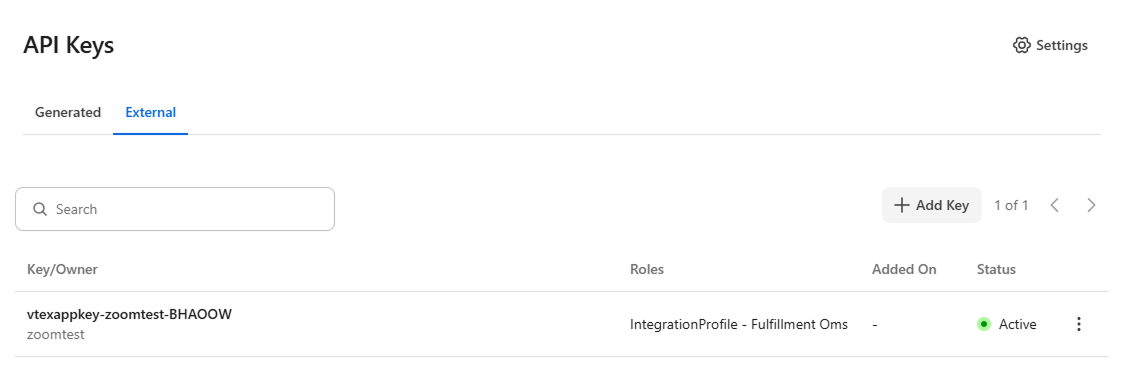\n\nThe page displays the following information in a table:\n\n| Column | Description |\n| :---- | :---- |\n| **Key/Owner** | API key, followed by the name of the external account that owns the key. |\n| **Roles** | Roles associated with the external API key. |\n| **Added On** | Date the external API key was added. |\n| **Status** | External API key status, which can be **Active** or **Inactive**. |\n\nThis page allows you to: \n\n* [Add external keys](#adding-external-keys)\n* [Edit external keys](#editing-external-keys)\n* [Remove external keys](#removing-external-keys)\n\n## Adding external keys\n\nTo add an external key to your account, follow the steps below: \n\n1. In the top bar of the VTEX Admin, click your **profile avatar** — indicated by the first letter of your email — and then click *Account Settings > API Keys*. \n2. Click the **External** tab. \n3. Click `Add Key`. \n4. Complete the **External key identification** field with a name to identify the API key. \n5. Select the [roles](/en/docs/tutorials/roles) that will be associated with the key. By default, no role is pre-selected.\n\n > ❗ Select only the roles required for the integration that will use the API key. Unrestricted use of overly permissive roles increases the risk of store attacks through leaked login credentials.\n\n6. Click `Add`.\n\n## Editing external keys\n\nFollow the steps below to change an external API key: \n\n1. In the top bar of the VTEX Admin, click your **profile avatar** — indicated by the first letter of your email — and then click *Account Settings > API Keys*. \n2. Click the **External** tab. \n3. In the row of the desired API key, click the kebab menu (⋮) and then `Edit`. \n4. Change the selection of roles associated with the API key. \n5. Click `Save`. \n\n## Removing external keys\n\nTo remove an external API key, follow the instructions below: \n\n1. In the top bar of the VTEX Admin, click your **profile avatar** — indicated by the first letter of your email — and then click *Account Settings > API Keys*. \n2. Click the **External** tab. \n3. In the row of the desired API key, click the kebab menu (⋮) and then `Remove` \n4. Click `Remove` to confirm.\n\n## Learn more\n\n* [API Keys](/en/docs/tutorials/api-keys)\n* [Configuring alerts to renew API tokens](/en/docs/tutorials/configuring-alerts-to-renew-api-tokens)\n* [Generated keys](/en/docs/tutorials/generated-keys)"}