{"section":"tutorials","requestedLocale":"en","requestedSlug":"enable-checkout-v6","locale":"en","slug":"enable-checkout-v6","path":"docs/en/tutorials/checkout/checkout-settings/enable-checkout-v6.md","branch":"main","content":"For more on the Checkout v6 advantages, access our article on the [new SmartCheckout™ release](/en/announcements/2019-05-21-dazzle-your-customer-with-the-new-smartcheckout-shopping-experience).\n\nTo update your store's checkout to the latest version (Checkout v6), you must enable it in both Test and Production environments.\n\n## Activate Checkout v6 in Test Environment \n\n1. In the VTEX Admin, go to __Store Settings > Storefront > Checkout__, or type __Checkout__ in the search bar at the top of the page.\n2. Click on the icon of the desired website.\n3. In the blue options menu located at the top of the page, click on __Checkout__.\n4. Under __Smart Checkout Update (V6)__, enable the __Test Environment (Beta)__ option by clicking the button.\n5. Click `Save`.\n6. [Access your store in beta/test environment](/en/docs/tutorials/accessing-the-beta-environment) and implement the necessary style adjustments. Checkout v6 has new _CSS_ classes that you need to be mindful of when performing style customizations.\n\n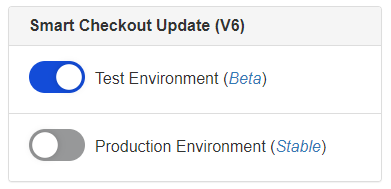\n\n## Activate Checkout v6 in Production Environment\n\nAfter the necessary adjustments are completed, you can activate Checkout v6 in the production environment, by following the steps below:\n\n1. In the VTEX Admin, go to __Store Settings > Storefront > Checkout__, or type __Checkout__ in the search bar at the top of the page.\n2. Click on the icon of the desired website.\n3. In the blue options menu located at the top of the page, click on __Checkout__.\n4. Under __Smart Checkout Update (V6)__, enable the __Production Environment (Beta)__ option by clicking the button and in the two checkboxes of the checklist.\n5. Click `Save`.\n\nAfter this step, Checkout v6 would be installed in your store.\n\n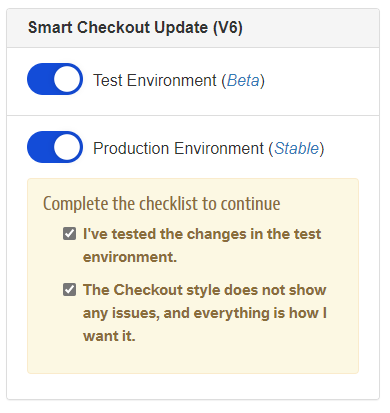\n\n## How to ascertain whether Checkout v6 was properly installed?\n\n1. Access the URL `{{accountName}}.myvtex.com/checkout`\n2. Press `Ctrl + U` on a Windows machine or `Opt + Cmd + U` if you're using Mac. The page's source code will be displayed.\n3. Press `CTRL + F` on a Windows machine or `Cmd + F` on a Mac to open the browser search box.\n4. Search for `checkout-ui/v6`. If you come across `//io.vtex.com.br/checkout-ui/v6.x.x/style/style.css` in the source code, the migration to Checkout v6 was successful."}