{"section":"tracks","requestedLocale":"en","requestedSlug":"managing-accounts","locale":"en","slug":"managing-accounts","path":"docs/en/tracks/payment-solutions/customer-credit-getting-started/managing-accounts.md","branch":"main","content":"Through the accounts screen in the VTEX Admin (__Apps > Customer Credit > Accounts__), you can access information from all accounts registered in the Customer Credit app in your store. \n\nWhen clicking on the name of a specific account, the __Account Details__ screen will display the following data:\n\n- [Holder Information](#holder)\n- [Credit Status](#status)\n- [Invoices issued](#invoices)\n- [Usage statement](#statements)\n- [Additional Holders](#additional-holders)\n- [Account closure](#account-closure)\n
\n
\n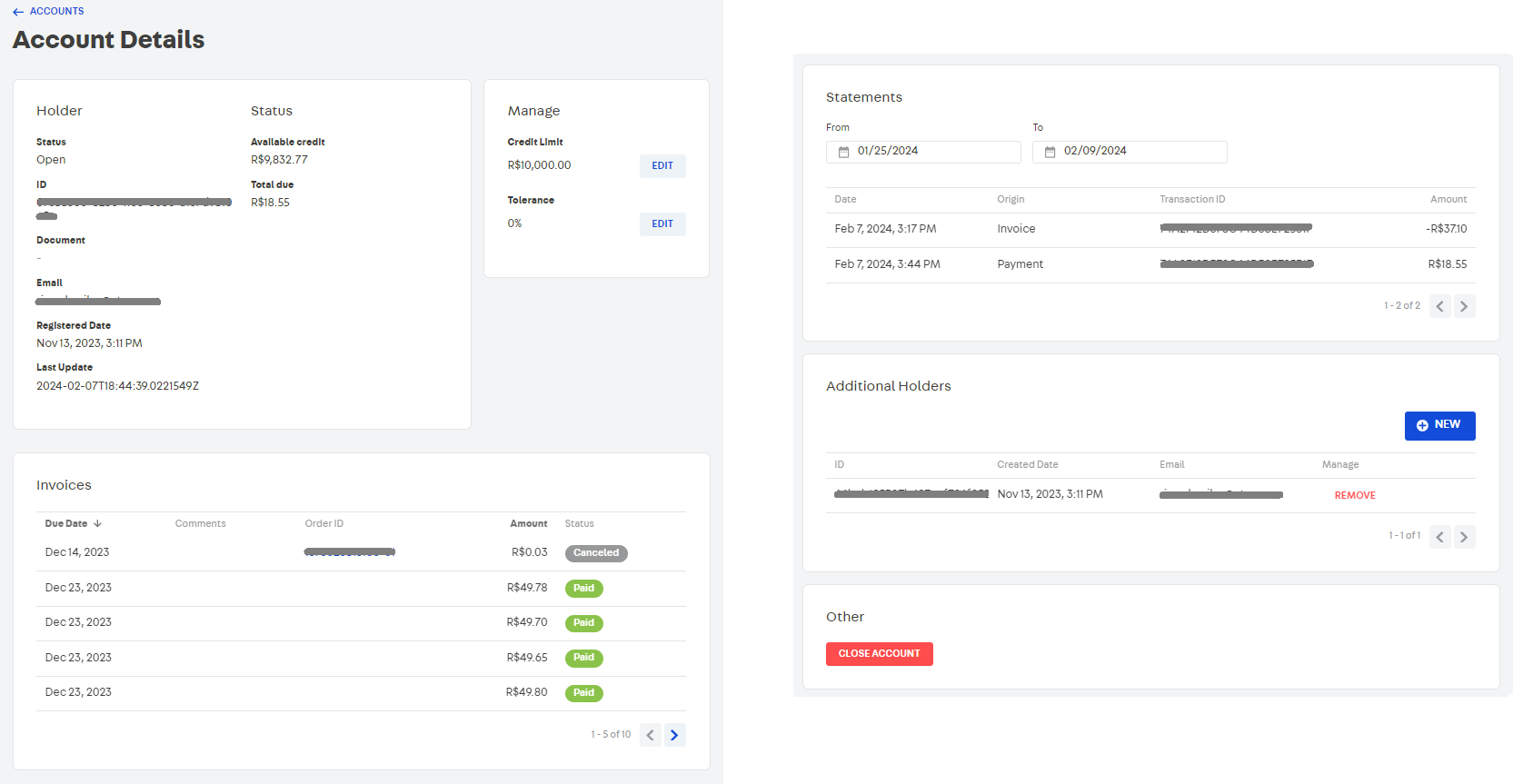\n\n## Holder\n\nIt presents information about the account status (active, inactive), identification code, registered document and email of the holder, account opening dates and last data update.\n\n## Status\n\nDisplays the amount of credit available for the customer to use for purchases and the total amount to be paid (in invoices) for purchases already made using Customer Credit as a means of payment.\n\n> ⚠️ When the customer makes a purchase using Customer Credit, but the order has not yet been billed (invoice issued), the **Reserved Credit** field is also displayed on this screen containing information on the order value.\n\n## Manage\n\nIndicates the maximum amount of credit granted to the customer and the tolerance to be used in purchases. These values can be edited at any time.\n\n## Invoices\n\nList containing the following information about all invoices issued in purchases made by the customer:\n\n- Due date\n- Comments (specific message for a invoice)\n- Order ID\n- Invoice amount\n- Invoice status (Open, Paid, Canceled, Expired)\n\n## Statements\n\nDisplays a report of all payment and invoice transactions carried out for the customer during a selected period.\n\n## Additional Holders\n\nThe __Additional Holders__ functionality allows the customer to share credits available for purchases with other people registered in the account.\n\nTo register a new dependent, follow the steps below:\n\n1. Within the customer account, under __Additional Holders__, click `NEW`.\n2. Enter the email of the person to be added as a dependent on the customer's account.\n3. Click `CONFIRM`.\n\nFrom this moment on, the customer and their dependent will be able to share the amount in __Available credit__ to make their purchases through Customer Credit.\n\n## Account closure\n\nIf you wish to close the customer's account, in the __Others__ section, click on `CLOSE ACCOUNT`.\n\n> ⚠️ A closed Customer Credit account cannot be reopened again and invoice, statement and additional dependent data will be deleted. However, after completing the account closure, if you wish, you can [open a new account](/en/tracks/customer-credit-como-comecar--1hCRg21lXYy2seOKgqQ2CC/7FHLd0cmxqqGeEUuc8uioU#creating-accounts-individually) for the customer using the same email as the closed account."}