{"section":"tutorials","requestedLocale":"en","requestedSlug":"coupons-list-beta","locale":"en","slug":"coupons-list-beta","path":"docs/en/tutorials/promotions-and-taxes/coupons/coupons-list-beta.md","branch":"main","content":"On the **Coupons** page, you can see all the [coupons](/en/docs/tutorials/coupons-beta) created in your store, manage their details and analyze how many times and in which orders they were used.\n\nOn this page, you can:\n\n* Search for coupons.\n* Export coupons.\n* View coupon usage details.\n* Filter coupons.\n* See the list of active coupons.\n* Access the list of archived coupons.\n* Create coupons.\n* Edit coupons.\n* Archive coupons.\n\nTo access this page in the VTEX Admin, click **Promotions > Coupons**.\n\n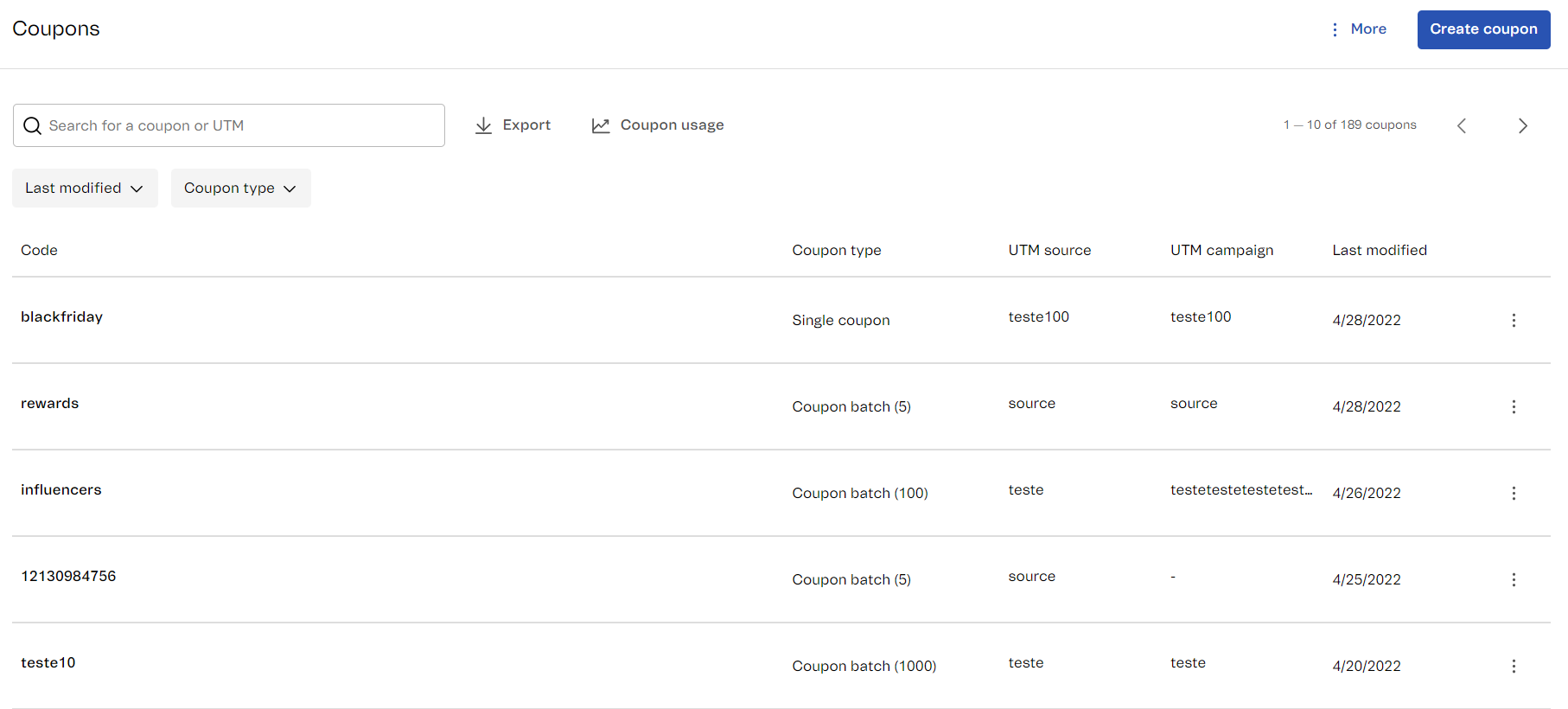\n\nBelow you will find a description of the page components and the actions you can perform.\n\n## Top bar\n\nThe top bar of the **Coupons** page contains a search field as well as filters and buttons for exporting coupons, consulting coupon usage details and accessing the archived coupon list. Learn more about each of these possibilities in the sections below.\n\n### Searching for coupons\n\nTo find a specific coupon, use the search field. You can search by coupon code, by [UTM source](/en/docs/tutorials/what-are-utm-source-utm-campaign-and-utm-medium) or by [UTM campaign](/en/docs/tutorials/what-are-utm-source-utm-campaign-and-utm-medium).\n\n### Filtering coupons\n\nUse the filters to view only coupons corresponding to certain criteria. To apply filters, follow the steps below.\n\n1. In the VTEX Admin, go to *Promotions > Coupons*, or type *Coupons* in the search bar at the top of the page.\n2. Select the filter you want to use:\n * **Last modified:** Indicates the last time a coupon was modified.\n * **Coupon type:** Indicates if it is a single coupon or a coupon batch. For a better understanding of different coupon types, please read [Coupons](/en/docs/tutorials/coupons-beta).\n3. Check the desired option.\n4. Click `Apply`.\n5. Repeat the process if you want to apply a different filter.\n\nTo clear the filters, i.e., to remove the applied filters, you have two options:\n\n* Click next to the filter you want to remove.\n* Click `Clear all filters` to remove all applied filters.\n\n### Exporting coupons\n\nYou can download all your coupons and their details in a CSV file.\n\nTo export the coupons, click the button `Export` next to the search field. The exported list will reflect the applied [filters](#filtering-coupons).\n\nThe generated file contains the information described below.\n\n| Column | Description |\n|---|---|\n| `code` | Coupon code. For a coupon batch, the generated code prefix is indicated. |\n| `type` | Indicates whether it is a `single` coupon or a coupon `batch`. For more information on each coupon type, please refer to [Coupons](/en/docs/tutorials/coupons-beta). To learn how to export the codes generated in a coupon batch, please read [Exporting coupon batch codes](#exporting-coupon-batch-codes). |\n| `quantity` | The number of coupon codes. For single coupons, the value is always `1`. For coupon batches, the number of codes for a specific coupon batch is indicated. |\n| `archived` | Indicates if the coupon is archived (`true`) or active (`false`). |\n| `utmSource` | Indicates the UTM source linked to the coupon, if any. |\n| `utmCampaign` | Indicates the UTM campaign linked to the coupon, if any. |\n| `maxUsage` | The maximum number of times the coupon can be used. |\n| `maxItemsPerClient` | Determines the maximum number of products to which the coupon can be applied. The defined quantity is valid for one or more purchases made by the same customer. This option mentions a value only for already existing coupons, configured with this limitation in previous versions of the __Coupons__ module. |\n| `expirationIntervalPerUse` | The minimum period of time before a coupon can be reused. |\n| `lastModified` | The date the coupon was last modified. |\n\nHere is an example of an exported CSV file:\n\n\n\n#### Exporting coupon batch codes\n\nThe exported CSV file displays one row for a coupon batch, which means it doesn't show all the codes within the coupon batch, only its prefix.\n\nTo view or export all the codes within a coupon batch, you must follow the steps below: \n\n1. Find the coupon batch in the [coupon list](#coupon-list).\n2. Click on the coupon batch row for more options.\n3. Click **Export**.\n\n Two options will appear on the screen:\n\n * **Copy all:** Allows you to copy the generated codes to your clipboard. You can also copy each code individually by clicking it.\n * **Export:** Allows exporting the generated coupons to a CSV file. The exported file contains a single column, with one code per row.\n\n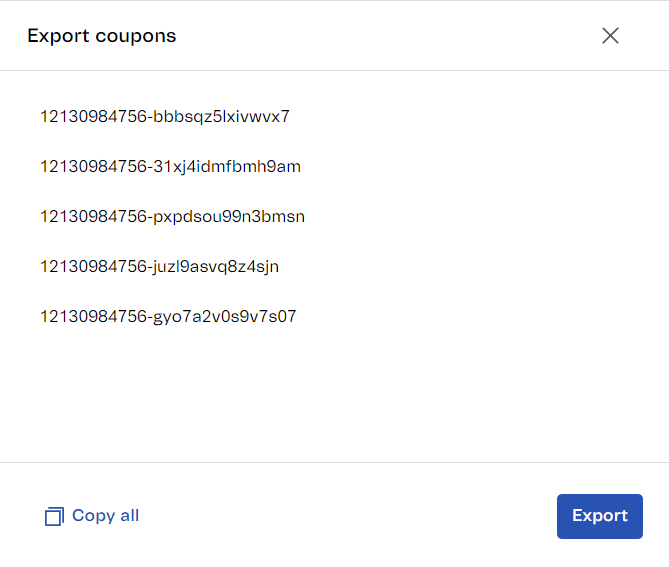\n\n### View coupon usage\n\nTo view the total number of active coupons and the remaining available space for new coupons, click `Coupon usage`.\n\n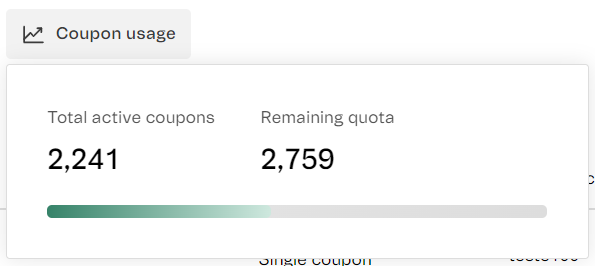\n\nYou are allowed a maximum of five thousand active coupons. To free up space, you can archive coupons in the [Coupon list](#coupon-list). If you need to increase the limit of active coupons, please contact our [Support team](https://support.vtex.com/hc/en-us/requests).\n\n### Accessing archived coupons\n\nTo access the archived coupon list, follow the steps below:\n\n1. In the top right corner of the **Coupons** page, click `More`.\n2. Click `Archived coupons`.\n\nThe archived coupon list presents the same information described in the [Coupon list](#coupon-list), except for the options available in the menu of each coupon row. The available options for archived coupons are:\n\n* **View:** Allows viewing the details of an archived coupon in a non-editable version of the [create and edit coupon form](/en/docs/tutorials/creating-a-coupon-beta).\n* **Unarchive:** Allows accessing a coupon for usage and editing.\n\n## Creating a coupon\n\nThe `Create coupon` button in the top right corner of the page allows you to access the form for creating a coupon. For more information on this procedure, please read [Creating a cupon](/en/docs/tutorials/creating-a-coupon-beta).\n\n## Coupon list\n\nThe coupon list presents all the active coupons in your store, starting with the most recent one. By clicking on a coupon from the list, you will be redirected to the [edit coupon page](/en/docs/tutorials/creating-a-coupon-beta).\n\nSee below for more details on each column of the list:\n\n* **Code:** Displays the coupon code.\n* **Coupon type:** Indicates if it is a [single coupon or a coupon batch](/en/docs/tutorials/coupons-beta).\n* **UTM source:** Indicates the [UTM source](/en/docs/tutorials/what-are-utm-source-utm-campaign-and-utm-medium) linked to the coupon, if any.\n* **UTM campaign:** Indicates the [UTM campaign](/en/docs/tutorials/what-are-utm-source-utm-campaign-and-utm-medium) linked to the coupon, if any.\n* **Last edit:** Displays the date the coupon was last modified.\n* **Button** : Displays a menu with several options, as described below:\n * **Edit:** Allows accessing the form for editing coupons to view or modify their details. Please read [Creating a coupon](/en/docs/tutorials/creating-a-coupon-beta) for more details on the form. Option available only for active coupons.\n * **Archive:** Allows archiving the coupon, i.e., deactivate it from being used in the store. Option available only for active coupons.\n * **Export:** Opens a modal containing coupon batch codes. You can copy them or export them to a CSV file. Option available only for coupon batches.\n * **View usage details:** Opens a modal containing coupon usage information. For more details, please read the [View usage details](#view-usage-details) section. Option available only for active coupons.\n\n### View usage details\n\nThe **View usage details** modal presents information on how each coupon was used, as described below:\n\n* **Linked promotions:** Displays the name of the promotion associated with the coupon, if any. By clicking on the promotion name, you will be redirected to the promotion editing page.\n\n The coupon becomes valid when associated with at least one promotion. To associate it, you must use the same [utm_source or utm_campaign](/en/docs/tutorials/what-are-utm-source-utm-campaign-and-utm-medium) both in the coupon and the promotion fields. Please read [Associating a coupon with a promotion](/en/docs/tutorials/creating-a-coupon-beta#associating-a-coupon-with-a-promotion) to learn more about this configuration.\n\n* **Usage** (single coupons): Displays the number of times the coupon can be used and the number of remaining uses, if you have set a usage limit.\n\n This section presents the list of orders in which a coupon has been used and allows you to search by order number. When you click on the order number, you will be redirected to the order details page in **Orders management**.\n\n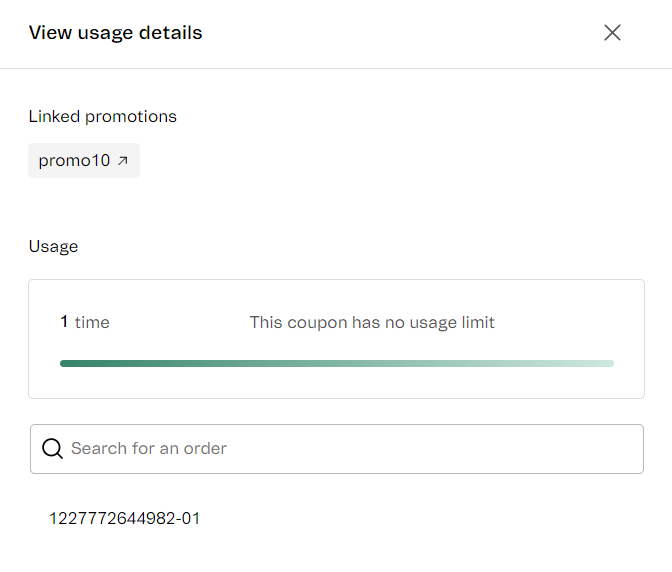\n\n* **General usage of the coupon codes** (coupon batches): Displays the total amount of times of the codes in a coupon batch have been used and the amount of remaining uses, if you have set a usage limit.\n\n This section also displays the list of codes in the coupon batch and allows you to search for a specific code. When you click on a code, you have access to the list of orders where the code has been used and you can search by an order number. Clicking on an order number will take you to the order details page in **Orders management**.\n\n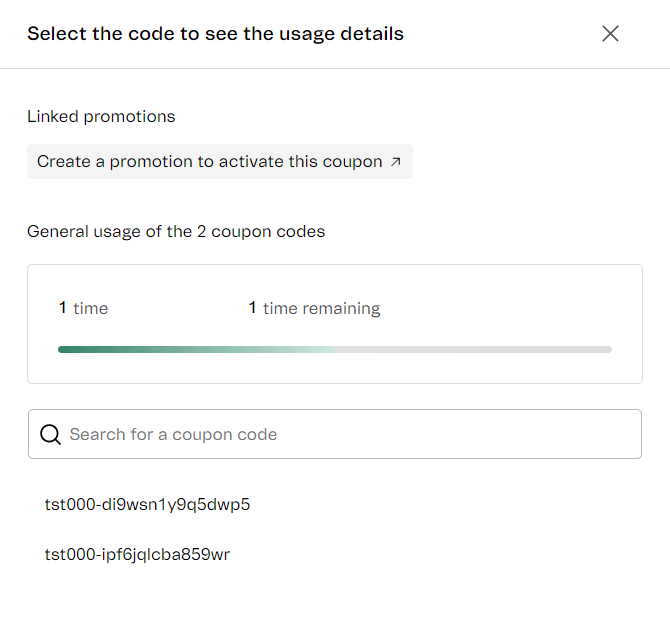\n\n## Learn more\n* [Coupons](/en/docs/tutorials/coupons-beta)\n* [Creating a coupon](/en/docs/tutorials/creating-a-coupon-beta)"}